Curling This Website Was a Mistake, but you *should* do it anyway (+ Ghost TTY)

Dave from YSAP has another great video, this time covering ANSI codes for terminals running bash. https://www.youtube.com/watch?v=H8HhyEQ2cA4 First, this site you *should* curl: curl ysap.sh Pretty output - the web page displayed using ANSI codes. This site though, this is something else, run in a new terminal: curl -NL hotdogstand.lol Then... run `reset` to fix the interesting colours. Then, fix what reset can't. What a fascinating deep-dive into ANSI control codes, as Dave always does. He leans on the GhostTTY documentation - which is better than I think I've ever seen anywhere else on ANSI codes. Anyone use GhostTTY? How do you like it? Looks like it has GPU accelerated graphics. In a terminal. Cool!

$ curl -NL hotdogstand.lol $ reset My terminal (Konsole on CachyOS) doesn't return to original state. I had to terminate. On 2026-03-12 17:05, Ron via Talk wrote:
Dave from YSAP has another great video, this time covering ANSI codes for terminals running bash.
https://www.youtube.com/watch?v=H8HhyEQ2cA4
First, this site you *should* curl:
curl ysap.sh
Pretty output - the web page displayed using ANSI codes.
This site though, this is something else, run in a new terminal:
curl -NL hotdogstand.lol
Then... run `reset` to fix the interesting colours.
Then, fix what reset can't.
What a fascinating deep-dive into ANSI control codes, as Dave always does.
He leans on the GhostTTY documentation - which is better than I think I've ever seen anywhere else on ANSI codes.
Anyone use GhostTTY? How do you like it? Looks like it has GPU accelerated graphics. In a terminal. Cool!
------------------------------------ Description: GTALUG Talk Unsubscribe via Talk-unsubscribe@lists.gtalug.org Start a new thread: talk@lists.gtalug.org This message archived at https://lists.gtalug.org/archives/list/ talk@lists.gtalug.org/message/S23NBG34P2RRKASW5SQC7K363GPLVD37/
William Park via Talk wrote on 2026-03-12 14:51:
$ curl -NL hotdogstand.lol $ reset
My terminal (Konsole on CachyOS) doesn't return to original state. I had to terminate.
Yup. There's a lot going on in those ANSI codes, it's fascinating. I picked them apart line by line (after converting to lines because it's a single string). Apparently one can map all 16 main colours to #ff0000?!? Still not 100% sure what happens, but am intrigued and impressed.

On Thu, 12 Mar 2026 at 17:05, Ron via Talk <talk@lists.gtalug.org> wrote:
Dave from YSAP has another great video, this time covering ANSI codes for terminals running bash.
https://www.youtube.com/watch?v=H8HhyEQ2cA4
First, this site you *should* curl:
curl ysap.sh
Pretty output - the web page displayed using ANSI codes.
This site though, this is something else, run in a new terminal:
curl -NL hotdogstand.lol
Then... run `reset` to fix the interesting colours.
Then, fix what reset can't.
What a fascinating deep-dive into ANSI control codes, as Dave always does.
He leans on the GhostTTY documentation - which is better than I think I've ever seen anywhere else on ANSI codes.
Anyone use GhostTTY? How do you like it? Looks like it has GPU accelerated graphics. In a terminal. Cool!
I haven't watched the video - yet. His videos are pretty good ... but I get annoyed by media telling me by their title "you're stupid." I avoided using the Dummies' Guides and Idiot's Guides for the same reason. Most of us aren't stupid - we know we lack knowledge and we're trying to learn. Your catchy name is insulting, and also implies you have an ego the size of a planet. Apologies if I sound ranty, but I have a long-standing problem with creators who insult their own users. But maybe "ranTTy" would be a good terminal name ... Or `runtty` (which of course is smaller than the rest of the littyr). Speaking of terminals: I switched from `alacritty` to `kitty` a few months ago. `ghostty` was the other option: I think both support both X11 and Wayland, but the main reason for the switch beyond that was that both support `timg` ( https://github.com/hzeller/timg ). The deciding factor was that `kitty` is in the Debian repositories while `ghostty` is not. I'm willing to build from source if there's a compelling reason to do so - but in this case there isn't because `kitty` meets my needs. If you're not familiar with `timg` you should look it up: it's an image display software that displays pixel-perfect images IN YOUR TERMINAL. If the terminal is supported. If the terminal isn't supported, it will still display a blocky version of the image. I do so much work in the terminal that image support is highly desirable - I wish I'd had it when I was administering remote servers for others, to be able to see the images on those remotes ... YSAP when `curl`ed looks great. But isn't he messing with and deliberately subverting the intended purpose of `curl`? What if you were curling the page to try to determine what was going on with the HTML - which is the normal(ish) reason people `curl` web pages? `curl -L hotdogstand.lol` does mess up `kitty` ... but `reset` also clears the changes properly. So that's good. Here's all the terminals I have currently installed on my system and their `reset` results: Term Reset alacritty FAIL gnome-terminal FAIL kitty SUCCESS konsole FAIL lxterm FAIL lxterminal FAIL uxterm FAIL xterm FAIL Interesting.
CachyOS repository doesn't have "timg", but it has "viu" which Google AI actually recommends. It seems "viu" only works on graphical terminal (eg. Konsole here). On virtual terminal, it's blocky, where each block is char size. So, that begs question... Why would you use "timg" or "viu", when every GUI desktop comes with graphic viewer (eg. Gwenview here)? Or, when you can use ImageMagick's "display" as last resort? On 2026-03-13 12:23, Giles Orr via Talk wrote:
If you're not familiar with `timg` you should look it up: it's an image display software that displays pixel-perfect images IN YOUR TERMINAL. If the terminal is supported. If the terminal isn't supported, it will still display a blocky version of the image. I do so much work in the terminal that image support is highly desirable - I wish I'd had it when I was administering remote servers for others, to be able to see the images on those remotes ...

On Fri, Mar 13, 2026 at 02:48:48PM -0400, William Park via Talk wrote:
CachyOS repository doesn't have "timg", but it has "viu" which Google AI actually recommends. It seems "viu" only works on graphical terminal (eg. Konsole here). On virtual terminal, it's blocky, where each block is char size.
So, that begs question... Why would you use "timg" or "viu", when every GUI desktop comes with graphic viewer (eg. Gwenview here)? Or, when you can use ImageMagick's "display" as last resort?
I think this is a case of "because you can". -- Len Sorensen
On Fri, 13 Mar 2026 at 15:33, Lennart Sorensen <lsorense@csclub.uwaterloo.ca> wrote:
On Fri, Mar 13, 2026 at 02:48:48PM -0400, William Park via Talk wrote:
CachyOS repository doesn't have "timg", but it has "viu" which Google AI actually recommends. It seems "viu" only works on graphical terminal (eg. Konsole here). On virtual terminal, it's blocky, where each block is char size.
So, that begs question... Why would you use "timg" or "viu", when every GUI desktop comes with graphic viewer (eg. Gwenview here)? Or, when you can use ImageMagick's "display" as last resort?
I think this is a case of "because you can".
Oh, there's always a bit of that. But no. First, and least important: I don't have to exit the terminal to use it. I don't have to deal with firing off an instance of `gwenview` or `ristretto`, I don't have to remember the key combo to close that other program and return to the terminal. More important: on my primary machine, I have an account where I do all my website development. This is a separate account from my main account that runs X11/Wayland. So I _can't_ run an image viewer from that account, it doesn't have permission to access the GUI. But `timg` works. The same _probably_ applies to remote web servers, like Digital Ocean or Azure. This is less clear, as it would require installing `timg` on the remote and I haven't tried that. But to view an image uploaded by someone else on a remote server, you have to `curl` that file to your local and then open it with an image viewer: kind of wrecks your flow. `timg` would be immensely superior. Thanks for mentioning `viu`. Sadly, it isn't currently available in the Debian repository. And as with my logic choosing `kitty` over `ghostty`, `timg` is Good Enough (TM) so I won't be spending the time to build `viu` from source. But I'll keep an eye on it. -- Giles https://www.gilesorr.com/ gilesorr@gmail.com
On Fri, Mar 13, 2026 at 04:26:57PM -0400, Giles Orr wrote:
Oh, there's always a bit of that. But no.
First, and least important: I don't have to exit the terminal to use it. I don't have to deal with firing off an instance of `gwenview` or `ristretto`, I don't have to remember the key combo to close that other program and return to the terminal.
More important: on my primary machine, I have an account where I do all my website development. This is a separate account from my main account that runs X11/Wayland. So I _can't_ run an image viewer from that account, it doesn't have permission to access the GUI. But `timg` works.
The same _probably_ applies to remote web servers, like Digital Ocean or Azure. This is less clear, as it would require installing `timg` on the remote and I haven't tried that. But to view an image uploaded by someone else on a remote server, you have to `curl` that file to your local and then open it with an image viewer: kind of wrecks your flow. `timg` would be immensely superior.
Thanks for mentioning `viu`. Sadly, it isn't currently available in the Debian repository. And as with my logic choosing `kitty` over `ghostty`, `timg` is Good Enough (TM) so I won't be spending the time to build `viu` from source. But I'll keep an eye on it.
That's a pretty neat use case for an image viewer in a terminal. -- Len Sorensen
On Fri, Mar 13, 2026 at 12:23:45PM -0400, Giles Orr via Talk wrote: [snip]
`curl -L hotdogstand.lol` does mess up `kitty` ... but `reset` also clears the changes properly. So that's good. Here's all the terminals I have currently installed on my system and their `reset` results:
Term Reset alacritty FAIL gnome-terminal FAIL kitty SUCCESS konsole FAIL lxterm FAIL lxterminal FAIL uxterm FAIL xterm FAIL
Interesting.
I tried it on windows terminal. Worked nicely as far as I can tell, reset did too. -- Len Sorensen
Giles Orr via Talk wrote on 2026-03-13 09:23:
I haven't watched the video - yet. His videos are pretty good ... but I get annoyed by media telling me by their title "you're stupid." I avoided using the Dummies' Guides and Idiot's Guides for the same reason.
Interesting comparison. He mentioned it once in a video / stream, and I forget why he named it that, mostly as a joke but IIRC it boiled down to "naming stuff is hard". Indeed, the Laws of Computers™ states the hardest things are: 1 naming things 2 cache invalidation 3 off-by-one errors 0 asynchronous programming
Most of us aren't stupid - we know we lack knowledge and we're trying to learn. Your catchy name is insulting, and also implies you have an ego the size of a planet.
Fortunately, he does not treat viewers as stupid, doesn't exhibit a large ego, and helps us learn a lot, so I'm willing to just call it "YSAP" and give benefit of the doubt here.
But maybe "ranTTy" would be a good terminal name ... Or `runtty` (which of course is smaller than the rest of the littyr).
Uh-oh, I'm afraid you'll summon He Who Shall Rant About Nonsense.
YSAP when `curl`ed looks great. But isn't he messing with and deliberately subverting the intended purpose of `curl`? What if you were curling the page to try to determine what was going on with the HTML - which is the normal(ish) reason people `curl` web pages?
He is messing with traditional uses of `curl`, but he's free to do as he wishes with his site. To debug it, I guess use the webdev tools in a browser or view source? "Because I can" is a valid reason to do something cool that doesn't hurt anything.
`curl -L hotdogstand.lol` does mess up `kitty` ... but `reset` also clears the changes properly. So that's good. Here's all the terminals I have currently installed on my system and their `reset` results:
Term Reset alacritty FAIL gnome-terminal FAIL kitty SUCCESS konsole FAIL lxterm FAIL lxterminal FAIL uxterm FAIL xterm FAIL
Interesting.
Indeed - thank you for testing all those! That's really helpful! I'll consider raising a bug report. Still don't understand why I can `echo -e "${purple}This is purple" but after that everything goes back to ketchup & mustard colours. Something deep is going on with palettes that I don't understand. Thanks again Giles, very useful info!
A month ago, I wrote this in another thread ("Curling This Website Was a Mistake, but you *should* do it anyway (+ Ghost TTY)"): On Fri, 13 Mar 2026 at 12:23, Giles Orr <gilesorr@gmail.com> wrote:
Speaking of terminals: I switched from `alacritty` to `kitty` a few months ago. `ghostty` was the other option: I think both support both X11 and Wayland, but the main reason for the switch beyond that was that both support `timg` ( https://github.com/hzeller/timg ). The deciding factor was that `kitty` is in the Debian repositories while `ghostty` is not. I'm willing to build from source if there's a compelling reason to do so - but in this case there isn't because `kitty` meets my needs.
I find it necessary to respond to my own message ... One of my old machines with a spinning disk - with 16G, not 8G - was swapping ferociously. And I'm not doing video or even photo editing on it. A couple days ago I finally got around to figuring out how to determine what was causing that (I installed Debian's `smem` Python script ... which pulled in more than 250MB of dependencies ...). Which seemed to show that the ten or so `kitty` instances I was running were each consuming multiple gigs of memory. Not all together - each one uses several gig. So I killed them all and went back to `xterm` and hey, look at that: 50G of swap that was full is suddenly empty and the machine is back to being its old responsive self. (Don't ask why I have a 50G swap partition. I don't know either. Probably some abandoned experiment.) Anyway: `kitty` is a very good terminal. It's also a very good way to destroy your machine's performance. I assume this is because it's storing pixel-level scroll-back logs or something like that. I'll keep it around for the use case I threw out in that other thread (viewing images on remote command-line-only servers with `timg`), but I'm in the midst of reconsidering my terminal choices ... -- Giles https://www.gilesorr.com/ gilesorr@gmail.com

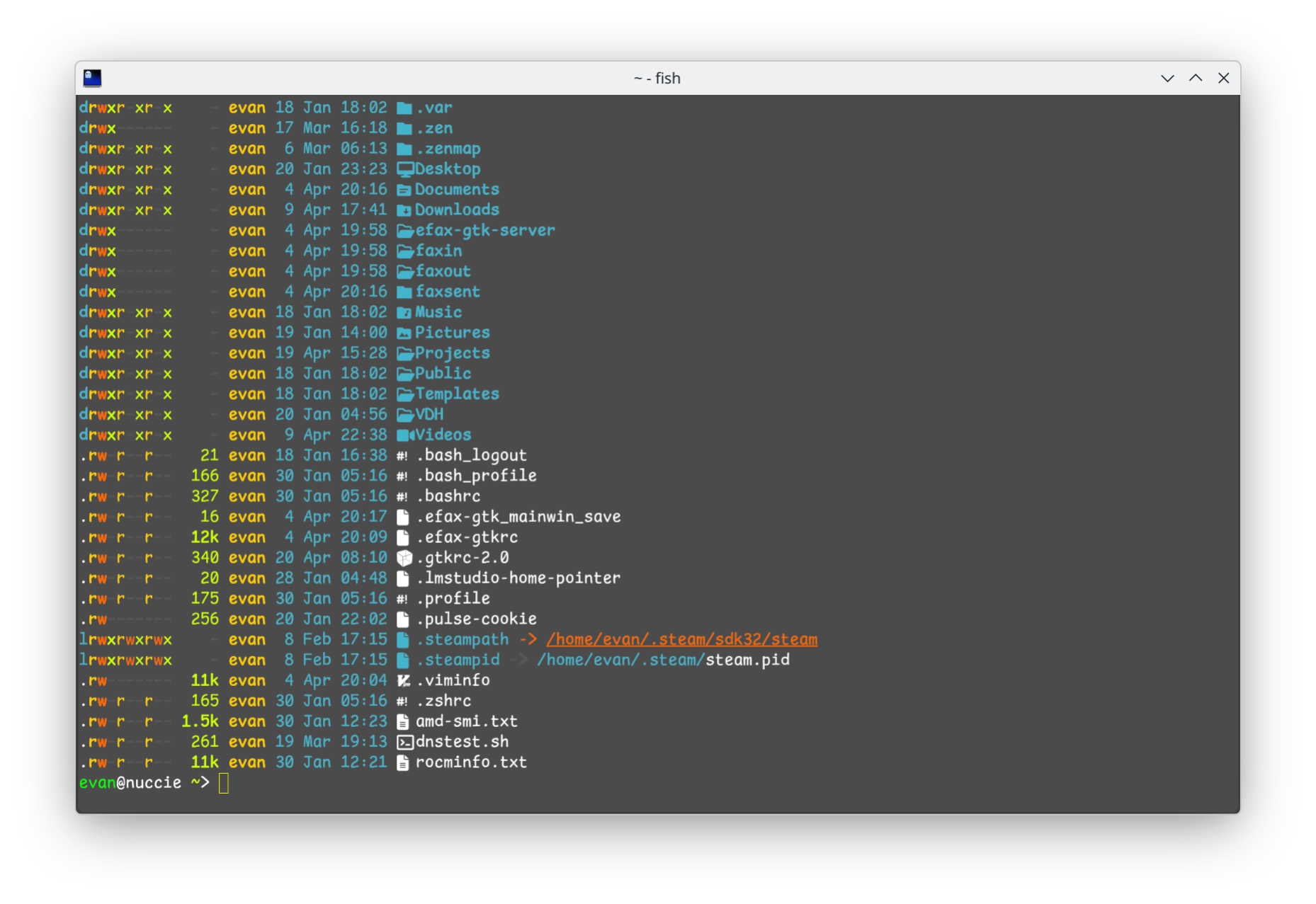
Apologies for missing this (and the original post) until now. I've been using ghostty+fish ever since Ron's talk on fish at GTALUG some months back. Very happy with the combination. Ghostty and fish are both in the CachyOS repo. Without any config changes, the combi looks great ... not just because of colour, but in using Unicode to provide icons when using `ls`, etc (example attached). I haven't yet done much coding using the fish syntax so I just use #! or explicitly run scripts with bash. I have not seen the performance hit that Giles describes. - Evan On Sat, Apr 18, 2026 at 12:41 PM Giles Orr via Talk <talk@lists.gtalug.org> wrote:
A month ago, I wrote this in another thread ("Curling This Website Was a Mistake, but you *should* do it anyway (+ Ghost TTY)"):
On Fri, 13 Mar 2026 at 12:23, Giles Orr <gilesorr@gmail.com> wrote:
Speaking of terminals: I switched from `alacritty` to `kitty` a few months ago. `ghostty` was the other option: I think both support both X11 and Wayland, but the main reason for the switch beyond that was that both support `timg` ( https://github.com/hzeller/timg ). The deciding factor was that `kitty` is in the Debian repositories while `ghostty` is not. I'm willing to build from source if there's a compelling reason to do so - but in this case there isn't because `kitty` meets my needs.
I find it necessary to respond to my own message ...
One of my old machines with a spinning disk - with 16G, not 8G - was swapping ferociously. And I'm not doing video or even photo editing on it. A couple days ago I finally got around to figuring out how to determine what was causing that (I installed Debian's `smem` Python script ... which pulled in more than 250MB of dependencies ...). Which seemed to show that the ten or so `kitty` instances I was running were each consuming multiple gigs of memory. Not all together - each one uses several gig. So I killed them all and went back to `xterm` and hey, look at that: 50G of swap that was full is suddenly empty and the machine is back to being its old responsive self.
(Don't ask why I have a 50G swap partition. I don't know either. Probably some abandoned experiment.)
Anyway: `kitty` is a very good terminal. It's also a very good way to destroy your machine's performance. I assume this is because it's storing pixel-level scroll-back logs or something like that. I'll keep it around for the use case I threw out in that other thread (viewing images on remote command-line-only servers with `timg`), but I'm in the midst of reconsidering my terminal choices ...
Just tried Ghostty here. My comments: - No GUI configuration. It's either from command line or from config file. It's okay only if you know where/how to find what you want. - "--key=value" is the syntax, and '=' is required. Manpage doesn't say anything about the syntax. You have to read 'ghostty --help'. - To open up login shell in 100x24 screen with 14pt font size, the correct incantation is "ghostty --command='direct:bash -l' --font-size=14 --window-width=100 --window-height=24" - If I run Ghostty from GUI panel, "viu" works. If I run Ghostty from command line, "viu" doesn't work. On 2026-04-20 11:13, Evan Leibovitch via Talk wrote:
I've been using ghostty+fish ever since Ron's talk on fish at GTALUG some months back. Very happy with the combination. Ghostty and fish are both in the CachyOS repo.
participants (5)
-
 Evan Leibovitch
 -
 Giles Orr
 -
 Lennart Sorensen
 -
 Ron
Ron -
 William Park