Anyone have experience with Bazzite Linux?

Fedora and KDE based. Immutable. Most installable apps are Flatpaks. Best tuned for AMD graphics. Apparently the best and easiest way to turn any PC into a SteamDeck, ie, gaming system. Has anyone here tried it? - Evan

Evan Leibovitch via Talk wrote on 2025-08-08 18:59:
Fedora and KDE based. Immutable. Most installable apps are Flatpaks. Best tuned for AMD graphics. Apparently the best and easiest way to turn any PC into a SteamDeck, ie, gaming system.
Has anyone here tried it?
Haven't tried it. However, KDE fans might be interested in KDE Linux (klinux shirley?), a new KDE-as-intended-by-the-devs project: https://kde.org/linux/ It's has some of the features you're looking for:
Arch and KDE based.
Immutable.
Most installable apps are Flatpaks.
Best tuned for AMD graphics but nVidea 16xx+ via nouveau
It seems they're somewhat constrained by the Ubuntu LTS that KDEneon is based upon as it doesn't update frequently enough. I find the LTS rather important, so not sure if I'll be giving KDE Linux a try, but wish them luck with it.
It's actually fascinating to me, the number and maturity of immutable distros being released recently, that is ones that have most of the root system read-only with minimal changes allowed to the system. I also don't know if I'd call it ironic that Arch, the most DIY of all the "core" distros, is the foundation of many such locked-down distributions. In addition to KDE Linux, Arch also powers the base SteamOS, while Bazzite is Fedora-based. I find it notable that all have chosen KDE over other graphic environments; even the current distro-du-jour, Catchy, is reported to have dropped GNOME support. The sea change in the Linux desktop is the now-muscular support for games thanks to the enormous support given by Valve to the Steamdeck and all things Linux. A new KDE reference system (still in alpha) is not that sea change, power users are already well cared for in this world. What's genuinely new is that Linux now has a legitimate shot at attracting newcomers thanks to un-borkable OSs and game support that sometimes surpassed performance under Windows. Further, in a world where Nvidia seems to be running away with the GPU market, the Linux approach seems to heavily favour AMD. An interesting video on the reason KDE devs found Neon to be less of a platform than they needed: https://www.youtube.com/watch?v=Dk1_nOPMuX0 and recently updated: https://www.youtube.com/watch?v=U6wyZkZ2IME And ... a popular tech channel tries Linux for the first time in 14 years and likes the result: https://www.youtube.com/watch?v=Sa8nMiEoti0 - Evan On Sat, Aug 9, 2025 at 12:11 AM Ron via Talk <talk@lists.gtalug.org> wrote:
Evan Leibovitch via Talk wrote on 2025-08-08 18:59:
Fedora and KDE based. Immutable. Most installable apps are Flatpaks. Best tuned for AMD graphics. Apparently the best and easiest way to turn any PC into a SteamDeck, ie, gaming system.
Has anyone here tried it?
Haven't tried it.
However, KDE fans might be interested in KDE Linux (klinux shirley?), a new KDE-as-intended-by-the-devs project:
It's has some of the features you're looking for:
Arch and KDE based.
Immutable.
Most installable apps are Flatpaks.
Best tuned for AMD graphics but nVidea 16xx+ via nouveau
It seems they're somewhat constrained by the Ubuntu LTS that KDEneon is based upon as it doesn't update frequently enough.
I find the LTS rather important, so not sure if I'll be giving KDE Linux a try, but wish them luck with it. ------------------------------------ Description: GTALUG Talk Unsubscribe via Talk-unsubscribe@lists.gtalug.org Start a new thread: talk@lists.gtalug.org This message archived at https://lists.gtalug.org/archives/list/talk@lists.gtalug.org/message/E24NPOR...

I am getting concerned about the disk space consumed by snap. flatpacks purportedly "deduplicate" and save disk space. what is the down side to flatpacks so they have not completely replaced snap? respond like I'm a novice (ex mainframer has trouble keeping up with pc terminology and processes).

CAREY SCHUG via Talk said on Sat, 9 Aug 2025 11:24:58 -0500 (CDT)
I am getting concerned about the disk space consumed by snap.
flatpacks purportedly "deduplicate" and save disk space.
what is the down side to flatpacks so they have not completely replaced snap?
Snaps require a specific init system: systemd. Therefore, snaps are dead to me. Modern flatpacks have no such limitation. Therefore, if I had to use one of these two package types, it would absolutely be flatpack, whether or not I would be using systemd at that particular time. How small is your disk? SteveT Steve Litt http://444domains.com
root is 32+ GB, everything but /home and swap Ubuntu I guess one alternative is to find non-snap installs. I don't have a lot of obscure software installed, so concerns for conflicts of packae levels are probably minimal. Yes, I know ubuntu is evil, but i fear trying to learn something new. Is there any possibility snaps will de-duplicate in the future, or does the basis for how they work make that impossible? could something like $path be made custom for every directory in my path, meaning if I am running a progrm in one directory, it would modify the path ONLY FOR those programs. it seems to me that this way I could have several versions of some basic tool installed, and different applications would just automatically use the correct one. Hate to repeat an old refrain, but that is how mainframes handle many different requirements. is there a ubuntu with flatpacks instead of snaps? anything written to help us ubuntu-morons transition to flatpacks by otherwise looking like ubuntu? Carey
On 08/09/2025 4:02 PM CDT Steve Litt via Talk <talk@lists.gtalug.org> wrote:
CAREY SCHUG via Talk said on Sat, 9 Aug 2025 11:24:58 -0500 (CDT)
I am getting concerned about the disk space consumed by snap.
flatpacks purportedly "deduplicate" and save disk space.
what is the down side to flatpacks so they have not completely replaced snap?
Snaps require a specific init system: systemd. Therefore, snaps are dead to me.
Modern flatpacks have no such limitation.
Therefore, if I had to use one of these two package types, it would absolutely be flatpack, whether or not I would be using systemd at that particular time.
How small is your disk?
SteveT
Steve Litt
------------------------------------ Description: GTALUG Talk Unsubscribe via Talk-unsubscribe@lists.gtalug.org Start a new thread: talk@lists.gtalug.org This message archived at https://lists.gtalug.org/archives/list/talk@lists.gtalug.org/message/PJMKP4M...
On Sat, Aug 9, 2025 at 6:18 PM CAREY SCHUG via Talk <talk@lists.gtalug.org> wrote:
Ubuntu I guess one alternative is to find non-snap installs. I don't have a lot of obscure software installed, so concerns for conflicts of packae levels are probably minimal.
Because the browser is so much a part of my use of the system -- not just to websites but also cloud apps and even localhost stuff -- that I think it's important to have a default browser that's a system package (.deb), closer to the iron and quicker to start. There are a number of places with instructions on how to: 1) add the firefox ubuntu PPA repository. 2) ensure that the .deb Firefox has priority over the snap one 3) (optional) delete the snap Firefox and instruct snapd to not try to reinstall Other apps I have less of a problem with, though I do prefer flatpaks over snaps partially beyond the size issue that you raise and the systemd dependency that is important to Steve. Primary to me is the massive single-point-of-failure in play given Canonical having tight control over the repository.
I know ubuntu is evil,
Not evil, just misguided. 🙂 but i fear trying to learn something new.
Been there. Tried Mint KDE and then Neon and Tuxedo and even Bazzite, now back to Kubuntu. It's not just fear of the unknown, it's also that the based-on-Ubuntu distros will by definition always be slower to deploy. Even if they fix things Ubuntu breaks they are always in reactive mode. Plus developers that have limited resources and can only officially support a few distros will always have Ubuntu in their lists.
Is there any possibility snaps will de-duplicate in the future, or does the basis for how they work make that impossible?
IMO the obstacle to Ubuntu just using flatpak like everyone else is business and politics rather than technical. Canonical has its reasons for reinventing this wheel -- somewhere -- and nothing will change until those reasons go away. - Evan
CAREY SCHUG via Talk wrote on 2025-08-09 15:09:
I know ubuntu is evil
It is not evil, actually. Neither is Canonical. I realize Carey might not be expressing his own opinion, but that of a small niche group of zealots, but I'll address this to those folks. How it can be "evil" to give away - for *free* - high quality software? That's something I'll never understand. Sure, it's not got the exact collections of packages wanted by every user, and an "init system [sic]" (actually a services management system) that is a crime against humanity or some such nonsense, and in other ways is not the exact thing the person receiving the *free* software wants, but that is not evil.
I guess one alternative is to find non-snap installs.
I've done that with Thunderbird & Firefox. The snaps were pretty nice, but I think clicking a mailto: link in Firefox didn't open an email in Thunderbird due to the confinement (sandboxing) level that Mozilla chose. But, for node.js, having snaps has been great. They're not confined and it's nice to be able to run multiple versions concurrently.
Is there any possibility snaps will de-duplicate in the future, or does the basis for how they work make that impossible?
Who knows? That would be a *lot* of work, so I doubt it. File systems like ZFS have built-in de-duplication, so that's an option. It'll use more in memory & CPU usage, so expanding disk space is probably cheaper.
it seems to me that this way I could have several versions of some basic tool installed, and different applications would just automatically use the correct one.
That's something snaps can help with - multiple versions. But probably not do-able via $path because applications are installed using system-wide libraries normally.
help us ubuntu-morons transition to flatpacks
apt install flatpak
On 08/10/2025 3:57 AM CDT Ron via Talk <talk@lists.gtalug.org> wrote:
CAREY SCHUG via Talk wrote on 2025-08-09 15:09:
I know ubuntu is evil
It is not evil, actually. Neither is Canonical.
apologies, must have been tired. Should have said --> ubuntu is "evil" <-- i.e. not liked, has problems/detractors/haters
I realize Carey might not be expressing his own opinion, but that of a small niche group of zealots, but I'll address this to those folks.
True of course, though I do agree to some extent with the zealots, especially that they to some extent "bully" others. ...
I guess one alternative is to find non-snap installs.
I've done that with Thunderbird & Firefox. The snaps were pretty nice, but I think clicking a mailto: link in Firefox didn't open an email in Thunderbird due to the confinement (sandboxing) level that Mozilla chose.
I'm guessing that is why when I right click a page in a chromium derived browser, select print, it hightlights the default name, but I can't just type a new name, i have to manually re-select the default name? Except that every now and then it WILL work for a while, then stop again. I thought at one point it worked for a while after a reboot, but then it didn't. I use the print-to-pdf to save some things, like whenever i buy something online, i prepend the date purchased, when it arrives in add in the date arrived. If I want more later I can search files to find the it again.
But, for node.js, having snaps has been great. They're not confined and it's nice to be able to run multiple versions concurrently.
Is there a "for REAL dummies" on that? several MAJOR releases ago I had a hyper multi timer that I really loved (it was developed for one game, but I used it for other things too). Developer was gone and old code would not run, maybe because new js was different? are the old versions available? It was mostly for a game, so I haven't worked on it that hard.
Is there any possibility snaps will de-duplicate in the future, or does the basis for how they work make that impossible?
Who knows? That would be a *lot* of work, so I doubt it.
AFAICS snaps are single files in /var/lib/snapd/snaps so this novice doesn't see how any "deduplication" could be done. most recently, when the root partition was almost full, there were the lastest two levels of something over a gb each. I kinda-remembered that was installed for something else that I didn't like and removed, but of course the removal of the end-user part did not remove the support layer it made me put in. at least I hoped i rememberes, so I went through the removal command and was not warned it would force something else to be removed, crossed my fingers and confirmed. seems to be ok. Over a year ago I had a problem where the old snaps were not automaically removed, and with my browsers revising every week or two, that kept filling my snaps directory and I had to manually remove the old ones. Eventually I did find a fix on the internet, don't recall what it was.
File systems like ZFS have built-in de-duplication, so that's an option.
IIRC, you can's Reiser root, so that would mean repartitioning everything, not possible for me without a fresh install on new hardware (and converting filesystems probably needs a clean fresh install anyway).
It'll use more in memory & CPU usage, so expanding disk space is probably cheaper.
My current system was purchased with excess memory and cpu for my normal usage, because the last install suffered memory leaks and (not sure of the term) things like zombies but still consuming CPU. Both of those required a reboot every 5-10 days.
it seems to me that this way I could have several versions of some basic tool installed, and different applications would just automatically use the correct one.
That's something snaps can help with - multiple versions.
But probably not do-able via $path because applications are installed using system-wide libraries normally.
I meant to suggest an ENHANCEMENT/UPGRADE to $PATH processing where programs and directories would have flags so the actual usage of $PATH would know to redirect to the correct actual directory FOR THAT REFERENCE ONLY. meaning a table so that if I am using the fortranv1 directory vs the fortranv2 directory some entries in the $PATH are internally & dynamically switched per the table of what version demands and one uses mathpackv4 while the other uses mathpackv7 although the $PATH actually contains "mathpack" only. In practice, I thought it would be that path includes a character not allowed in a filename, but i was disabused of that by asking for characters not allowed, and maybe it would be something like "mathpack?" would send the internal processing to see if that should be "mathpackv4" vs "mathpackv7". If someone really had a ? in a directory name, it would have to be escaped in $PATH. Maybe there are complactions that make this not possible? Or in my ignorance I am completely confused and off base?
help us ubuntu-morons transition to flatpacks
apt install flatpak
Step one of 5? 50? Do I have to create my own flatpacks from the normal install? And the fear it would break something else to have both. Found this, https://news.ycombinator.com/item?id=24383561 though will not consider switching to RPMs (first suggestion). Maybe think about straight Debian or Mint (which I think some friends were pushing a while ago, though not any more). Probably should just search for apt install package for my browser for now,
CAREY SCHUG via Talk wrote on 2025-08-09 15:09:
Is there any possibility snaps will de-duplicate in the future, or does the basis for how they work make that impossible?
The latest Linux Matters podcast (https://linuxmatters.sh/61/) has Alan Pope (once part of the snap team at Canonical) discussing his ~50 snap packages he maintains, few of which he authored - merely packaged, and the issues he's having. He praises Flatpak for some of their choices. I seem to recall one issue was size of downloads, another being ease of dependency management. It's interesting to hear his take on it.
Alan Pope
Alan started the Ubuntu Podcast back in 2008, which ran for 13 years with a variety of presenters. He worked at Canonical for 9 years on the Community Team and latterly the Snap Advocacy Team as an Engineering Manager, Community Manager, and Developer Advocate.
Co-host Martin Wimpress is best known for Mate desktop environment (co-founder and project leader of Ubuntu Mate). Formerly engineering director for Ubuntu at Canonical. The Linux Dev Time podcast (same Late Night Linux family of podcasts) discusses Not Invented Here Syndrome, the pros and cons of starting a new project instead of using something existing. * might only want a subset of features * might not be able to get one's desired features accepted upstream * might be result of under estimating the workload in re-implementing * easier to start new code base than try to understand someone else's before being able to contribute anything * etc. All the Late Night Linux podcasts are highly recommended. https://latenightlinux.com/
if I find an apt package to install a chrome derived browser, will it find all my multiple profiles wit their bookmarks, cache, etc, or will I have to start all over again? please answer me like I'm a pre-2000 mainframer (which I am). Carey

No, it won't find your bookmarks, cookies, cache, anything. Not automatically. A snap is a container, and while your non-snap Chrome stores its files in ~/.config folder, your snap-Chrome will store it on .snap/chrome or something like that. To make it see your non-snap profile, you have to create a link between those two. And if you are abandoning the snap version for good, just move the files to your .config and it will work. Mauro https://www.maurosouza.com - registered Linux User: 294521 Scripture is both history, and a love letter from God. On Tue, Aug 12, 2025 at 11:38 AM CAREY SCHUG via Talk <talk@lists.gtalug.org> wrote:
if I find an apt package to install a chrome derived browser, will it find all my multiple profiles wit their bookmarks, cache, etc, or will I have to start all over again?
please answer me like I'm a pre-2000 mainframer (which I am).
Carey ------------------------------------ Description: GTALUG Talk Unsubscribe via Talk-unsubscribe@lists.gtalug.org Start a new thread: talk@lists.gtalug.org This message archived at https://lists.gtalug.org/archives/list/talk@lists.gtalug.org/message/NMNC7NF...
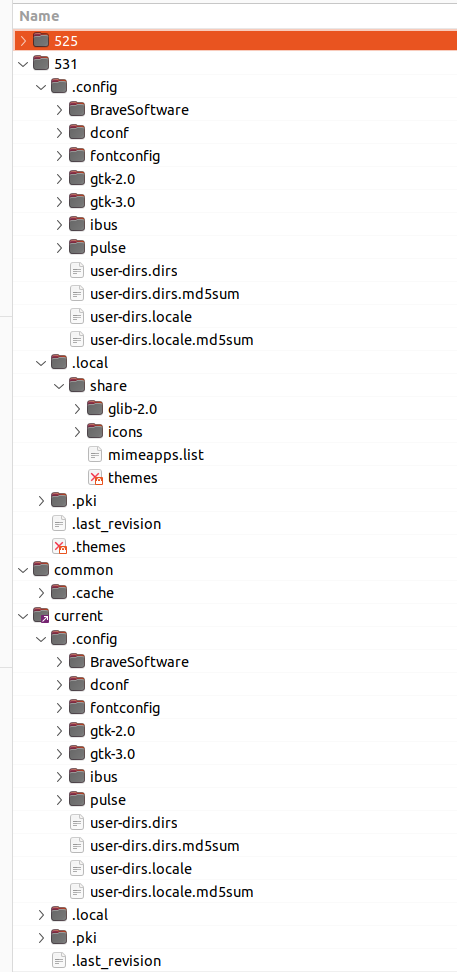
ASIDE: THANKS THANKS THANKS...in poking around ".config" I found an options file for "simple image reducer" which I had wanted an upgrade to...now don't need, it is there. I added options for larger numbers of pixels, first to reduce panoramic photos from my phone--a 360 panorama cut down to the default 2048 max is useless, and second to not change the size but to take advantage of that program's better compaction than my phone. I can maybe just barely see a difference between the 3.7 MB photo from my phone and my "reduced" with same number of pixels at 834K. BUT the correspondance in the snap/brave directory and .config is not obvious to this outsider... (I've been trying to find a way to copy the directory structure from my file manager to plain text to post here, since I can't send images, no luck) under snap/brave there are two directories 525 and 531, presumably for two snap levels. under each of those .local, common, .pki, ,config, current and under some of those BraveSoftware and other directories. OK, some of those were copied FROM the original .local, .config maybe others so I just ignore, but the remaining files under the snap will have to be manually merged back into multiple directories under my home. I kind of expect "BraveSoftware" will not be a subdirectory under .config, but maybe I am wrong. I presume likely among the many possible bits I could get wrong, I could just wipe out everything and lose all. question: If I do an apt install, will that be safe from damaging the snaps? can I install it as Brave2? So if I try to copy individual bits I only risk the new apt install, and the old snap will be unaffected? Or maybe I should look for a different "secure" browser and just switch, importing profiles or recreating equivalents. Carey
On 08/12/2025 10:20 AM CDT Mauro Souza via Talk <talk@lists.gtalug.org> wrote:
No, it won't find your bookmarks, cookies, cache, anything. Not automatically.
A snap is a container, and while your non-snap Chrome stores its files in ~/.config folder, your snap-Chrome will store it on .snap/chrome or something like that. To make it see your non-snap profile, you have to create a link between those two. And if you are abandoning the snap version for good, just move the files to your .config and it will work.
Mauro https://www.maurosouza.com - registered Linux User: 294521 Scripture is both history, and a love letter from God.
On Tue, Aug 12, 2025 at 11:38 AM CAREY SCHUG via Talk <talk@lists.gtalug.org mailto:talk@lists.gtalug.org> wrote:
if I find an apt package to install a chrome derived browser, will it find all my multiple profiles wit their bookmarks, cache, etc, or will I have to start all over again?
please answer me like I'm a pre-2000 mainframer (which I am).
Carey ------------------------------------ Description: GTALUG Talk Unsubscribe via Talk-unsubscribe@lists.gtalug.org mailto:Talk-unsubscribe@lists.gtalug.org Start a new thread: talk@lists.gtalug.org mailto:talk@lists.gtalug.org This message archived at https://lists.gtalug.org/archives/list/talk@lists.gtalug.org/message/NMNC7NF...
------------------------------------ Description: GTALUG Talk Unsubscribe via Talk-unsubscribe@lists.gtalug.org Start a new thread: talk@lists.gtalug.org This message archived at https://lists.gtalug.org/archives/list/talk@lists.gtalug.org/message/KQU5P45...
Remember, non-expert here. I was a Solaris sysasmin 1997-2001 or so, could do some piping and scripting, but haven't done that since, so forgot. duh, since this is going directly to you, not just through list server, I can include a screenshot of the directory structure. I could not find a way to do ls recursively, but NOT list files, just directories, and preferrably only x deep. Remember a bazillion cache files and other cr*p. a web search suggested "dir". same issue. I tried listing with dir to file, sorting to get hopefully just what I wanted together, but too long (12.5 mb) to delete other stuff. At one time I could do a shell script to intelligently select lines, but I've forgotten how. Had not heard of tree, was not installed, installed it, but: carey@OptiPlex-7050:~/snap/brave$ tree ? ? [error opening dir] 0 directories, 0 files carey@OptiPlex-7050:~/snap/brave$ tree . [error opening dir] 0 directories, 1 file carey@OptiPlex-7050:~/snap/brave$ man tree No manual entry for tree Carey
On 08/12/2025 5:17 PM CDT D. Hugh Redelmeier via Talk <talk@lists.gtalug.org> wrote:
From: CAREY SCHUG via Talk <talk@lists.gtalug.org>
(I've been trying to find a way to copy the directory structure from my file manager to plain text to post here, since I can't send images, no luck)
ls(1)? tree(1)?
I was an OpenBSD admin in 2002-2003, Linux admin since 2001, IBM zVM admin since 2006. I find this snap/flatpak world confusing: bind mounts, virtual directories, multiple copies of the same libraries, apt-get dist-upgrade does not upgrade vulnerable libraries because there's a copy inside a snap. It's a mess. Looks like you have the snap version of tree, so when you run it, it runs inside its own snap container and cannot access Brave container, so it won't list anything. Looking at https://askubuntu.com/a/1245306/800622 I see that removing the snap version and installing the apt version should work. I cannot not test because one of the first things I do on my Ubuntu installations is purging any and every snap installed, removing snapd and blocking it from installing again with sudo apt-mark hold snapd. I like Brave but I use Vivaldi. It's made by the team that made Opera great, the Opera from before. It's Chromium based, so all extensions work the same, all sites work the same. It's light on resources and very quick, so it's my daily driver since one of the first public releases, when it was in alpha stage and I was disappointed with Firefox sluggishness and Chrome privacy-invading features. And it has an official deb build. Mauro https://www.maurosouza.com - registered Linux User: 294521 Scripture is both history, and a love letter from God. On Tue, Aug 12, 2025 at 8:05 PM CAREY SCHUG via Talk <talk@lists.gtalug.org> wrote:
Remember, non-expert here. I was a Solaris sysasmin 1997-2001 or so, could do some piping and scripting, but haven't done that since, so forgot.
duh, since this is going directly to you, not just through list server, I can include a screenshot of the directory structure.
I could not find a way to do ls recursively, but NOT list files, just directories, and preferrably only x deep. Remember a bazillion cache files and other cr*p.
a web search suggested "dir". same issue.
I tried listing with dir to file, sorting to get hopefully just what I wanted together, but too long (12.5 mb) to delete other stuff. At one time I could do a shell script to intelligently select lines, but I've forgotten how.
Had not heard of tree, was not installed, installed it, but:
carey@OptiPlex-7050:~/snap/brave$ tree ? ? [error opening dir]
0 directories, 0 files carey@OptiPlex-7050:~/snap/brave$ tree . [error opening dir]
0 directories, 1 file carey@OptiPlex-7050:~/snap/brave$ man tree No manual entry for tree
Carey
On 08/12/2025 5:17 PM CDT D. Hugh Redelmeier via Talk < talk@lists.gtalug.org> wrote:
From: CAREY SCHUG via Talk <talk@lists.gtalug.org>
(I've been trying to find a way to copy the directory structure from my file manager to plain text to post here, since I can't send images, no luck)
ls(1)? tree(1)?------------------------------------ Description: GTALUG Talk Unsubscribe via Talk-unsubscribe@lists.gtalug.org Start a new thread: talk@lists.gtalug.org This message archived at https://lists.gtalug.org/archives/list/talk@lists.gtalug.org/message/KFDVSYR...

From: CAREY SCHUG via Talk <talk@lists.gtalug.org>
Remember, non-expert here. I was a Solaris sysasmin 1997-2001 or so, could do some piping and scripting, but haven't done that since, so forgot.
ls(1) has been in UNIX from the beginning. It has grown some more flags over the years.
duh, since this is going directly to you, not just through list server, I can include a screenshot of the directory structure.
(You seem to have sent this to the list.)
I could not find a way to do ls recursively, but NOT list files, just directories, and preferrably only x deep. Remember a bazillion cache files and other cr*p.
ls */. */*/. */*/*/. */*/*/*/.

On Tue, Aug 12, 2025 at 09:55:33PM -0400, D. Hugh Redelmeier via Talk wrote:
From: CAREY SCHUG via Talk <talk@lists.gtalug.org>
Remember, non-expert here. I was a Solaris sysasmin 1997-2001 or so, could do some piping and scripting, but haven't done that since, so forgot.
ls(1) has been in UNIX from the beginning. It has grown some more flags over the years.
duh, since this is going directly to you, not just through list server, I can include a screenshot of the directory structure.
(You seem to have sent this to the list.)
I could not find a way to do ls recursively, but NOT list files, just directories, and preferrably only x deep. Remember a bazillion cache files and other cr*p.
ls */. */*/. */*/*/. */*/*/*/.
There is a reason 'find' exists. find . -type d -maxdepth 3 Combined with xargs you can really do a lot. -- Len Sorensen
An AI query says I have to remove the snap first, then install the package, which I presume will lose everything I have configured (12 "users", using different emails by default, configured for games, etc) Convert Brave Snap to Apt Yes, there are instructions for converting from the Brave browser snap to a directly apt-installed version, although the process requires manual steps. The snap version of Brave is community-maintained and may not always be up-to-date, so the official recommendation is to use the apt method instead. To switch from the snap to the apt version, you first need to remove the snap installation. This can be done using the command sudo snap remove brave. After removing the snap, you can install the official apt version by following the standard procedure. This involves installing required packages, adding the Brave GPG key, and adding the Brave repository to your system's sources list. The key steps are: Install apt-transport-https and curl: sudo apt install apt-transport-https curl Retrieve and install the Brave GPG keyring: sudo curl -fsSLo /usr/share/keyrings/brave-browser-archive-keyring.gpg https://brave-browser-apt-release.s3.brave.com/brave-browser-archive-keyring... Add the Brave repository to your sources list: echo "deb [signed-by=/usr/share/keyrings/brave-browser-archive-keyring.gpg arch=amd64] https://brave-browser-apt-release.s3.brave.com/ stable main" | sudo tee /etc/apt/sources.list.d/brave-browser-release.list Update your package index and install the Brave browser: sudo apt update && sudo apt install brave-browser This process ensures you have the official, up-to-date version of Brave installed via the standard package manager. Carey
CAREY SCHUG via Talk said on Tue, 12 Aug 2025 09:38:36 -0500 (CDT)
if I find an apt package to install a chrome derived browser, will it find all my multiple profiles wit their bookmarks, cache, etc, or will I have to start all over again?
please answer me like I'm a pre-2000 mainframer (which I am).
Hi Carey, You absolutely don't want to save your cache. By definition it's temp stuff that goes out of date. Bookmarks: Every browser has its own bookmarking system, and that sucks. I have a bookmarking system that runs *outside* of any browser, so it's universal across many browsers and if necessary make it available across your LAN. As I remember, it's native format is a tab indented outline, and the program consists of a python program and a shellscript. It never screws up so I long ago forgot exactly how it works, but later I can post the python program and shellscript, along with a small tab indented outline, to this mailing list. I think you can obtain a text list of bookmarks from Chrome, and then type it into the tab indented outline. HTH, SteveT SteveT Steve Litt http://444domains.com
Followup. I spent the whole bloody day trying to install Bazzite. Normally distro installation should take less than an hour, usually much less. It despises dual boot. It does not like Nvidia GPUs. I had to log into Steam again every time it rebooted. Oh, and that reboot takes 2:30 on my medium-power system. My time appears to be average, for some bootup time is five minutes. Apparently this is normal. It seems so new-to-Linux-focused that *any* prior experience in Linux may be an obstacle because there's so much to unlearn. I will be un-installing. CachyOS, anyone?
Evan Leibovitch via Talk said on Sat, 9 Aug 2025 21:58:15 -0400
It does not like Nvidia GPUs.
So who does? Remember the words of Linus. SteveT Steve Litt http://444domains.com
On Sun, Aug 10, 2025, 01:27 Steve Litt via Talk <talk@lists.gtalug.org> wrote:
Evan Leibovitch via Talk said on Sat, 9 Aug 2025 21:58:15 -0400
It does not like Nvidia GPUs.
So who does?
Davinci Resolve Anything that does ray tracing AI servers Coin miners Anything written just for CUDA Most consumers Unfortunate, but green outsells red by quite a bit. It's nice that AMD gets some love on the Linux side, but in many other corners it's a second class citizen. - Evan
put your vm definitions on a usb with a write protect switch, use writeable disks for data only, swap & work space, and complete immunity from permanant maleware, a reboot gives a fresh start. put your most critical data on a reiser disk with a checkpoint at each hypervisor boot for one more level. question: to ransomware programs detect reiser and subvert them? I would think the encrypting would set off alarms with space usage./ Carey
participants (7)
-
 CAREY SCHUG
 -
 D. Hugh Redelmeier
 -
 Evan Leibovitch
 -
 Lennart Sorensen
 -
 Mauro Souza
 -
 Ron
Ron -
 Steve Litt